CBC design settings
Introduction
The goal of CBC design is to gather enough data from each respondent to estimate their preferences accurately, without overwhelming them.
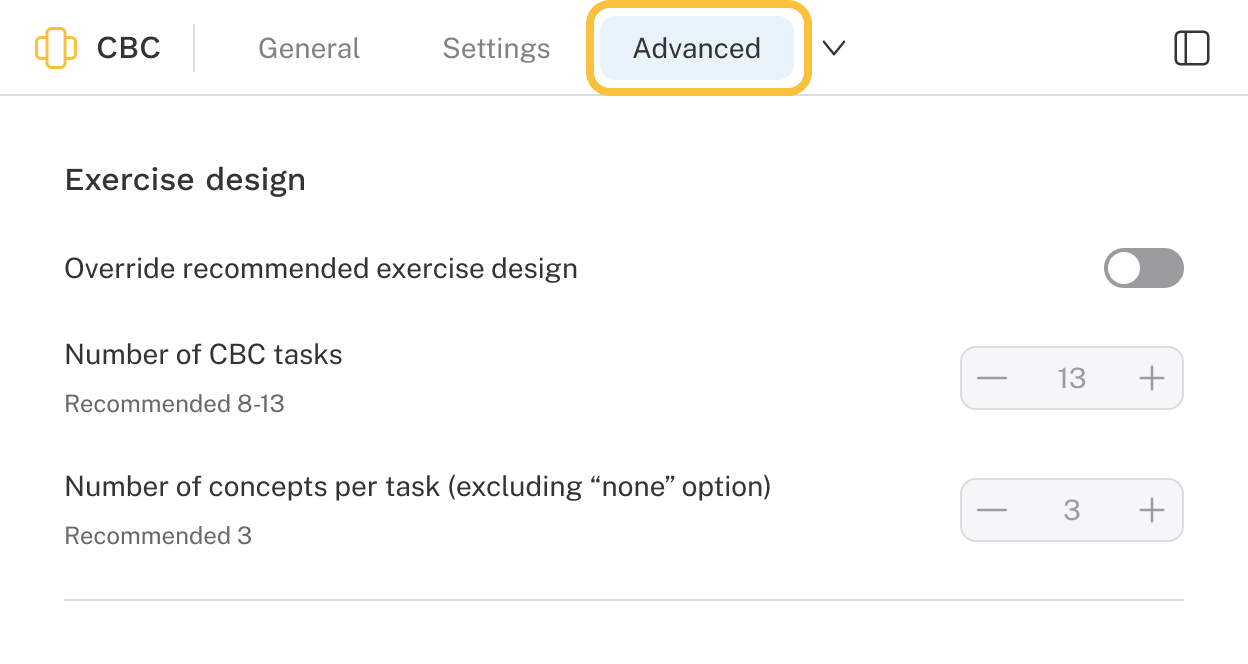
To help, Discover includes a built-in recommender that looks at your defined attributes and levels and suggests the number of tasks and concepts per task. If you’d like more control, you can override these recommendations in the Exercise design settings (found in the Advanced tab of a CBC exercise).
The default designer
When the Exercise design override toggle is switched off (input fields are disabled), a CBC exercise’s settings (such as number of tasks and how many concepts to display per task) are auto-generated based on the number of list items included in the exercise.
“Tasks” are also known as questions, concepts, profiles, or cards.
Even in the disabled state, however, the fields in this section communicate valuable information about the exercise design that will be used during data collection (fielding). You can see the total number of tasks (questions) a respondent will be shown as well as the number of concepts (profiles or cards) that will be shown in each task.
How does the designer work?
Behind the scenes, the Discover exercise designer selects attribute levels to show across multiple tasks (questions) according to the following goals:
- Each level within the same attribute should appear an equal number of times.
- Each level of an attribute should appear with levels of other attributes an equal number of times.
- As a final step, the designer does some rearranging of the concept order within each task and rearranging the task order to try to improve:
- The balance in how often each level appears in each concept position (left, middle, right, etc.).
- How evenly dispersed attribute levels are across tasks, trying to avoid showing the same level in consecutive (or nearby) tasks.
Depending on your attribute/level list and number of tasks (questions) to show, it may not be possible to achieve perfection on all three goals; but CBC questionnaires that are almost-but-not-quite perfect are still very efficient and you will obtain excellent results in practice.
Heading 1
Heading 2
Heading 3
Heading 4
Heading 5
Heading 6
Lorem ipsum dolor sit amet, consectetur adipiscing elit, sed do eiusmod tempor incididunt ut labore et dolore magna aliqua. Ut enim ad minim veniam, quis nostrud exercitation ullamco laboris nisi ut aliquip ex ea commodo consequat. Duis aute irure dolor in reprehenderit in voluptate velit esse cillum dolore eu fugiat nulla pariatur.
Block quote
Ordered list
- Item 1
- Item 2
- Item 3
Unordered list
- Item A
- Item B
- Item C
Bold text
Emphasis
Superscript
Subscript